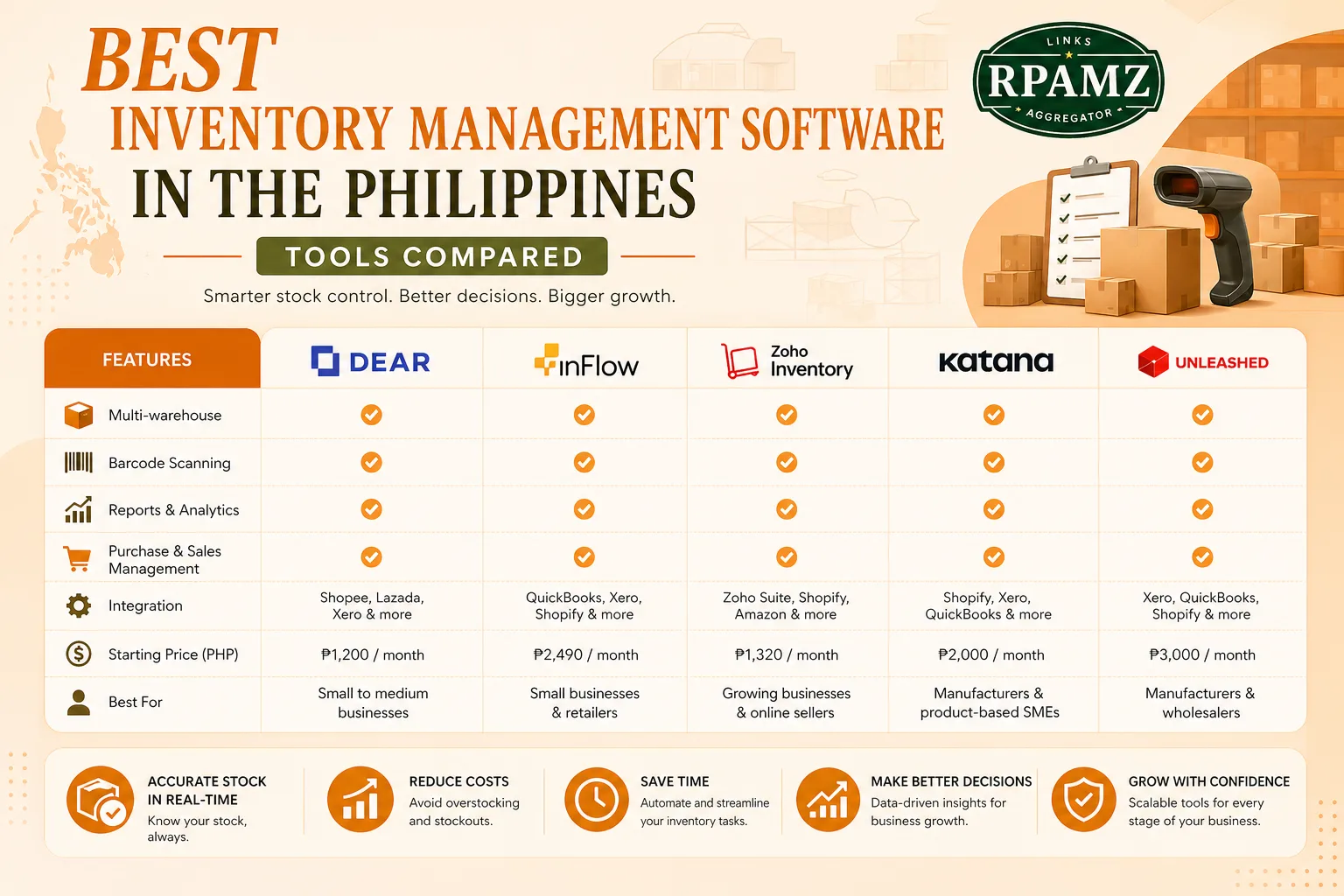
Best Inventory Management Software in the Philippines Tools Compared
Choosing the best inventory management software Philippines businesses can rely on is not just about tracking stock. It is about reducing stockouts, avoiding over-ordering, syncing sales channels, and making day-to-day operations easier for ecommerce, retail, and wholesale teams.
If you are selling on a website, in a physical store, through marketplaces, or all three, the right inventory system can help you stay organized and protect cash flow. In this guide, we compare practical options, what they do well, and how to choose the right one for your business.
What to look for in inventory software
Before comparing tools, focus on the features that matter most for Philippine businesses:
- Multi-channel syncing for ecommerce, POS, and marketplaces
- Barcode scanning and SKU management
- Purchase order and supplier tracking
- Low-stock alerts and reorder points
- Bundling or kitting for set products
- Warehouse or branch management
- User permissions for staff control
- Reporting for fast-moving and slow-moving items
- Integrations with accounting, ecommerce, and shipping tools
- Local fit for businesses operating in the Philippines, including tax and operational workflows
Quick comparison table
| Tool | Best for | Pricing model | Strengths | Watch out for |
|---|---|---|---|---|
| Zoho Inventory | Small to growing ecommerce businesses | Free and paid tiers | Good automation, integrations, order management | Advanced features may require higher tiers |
| Sortly | Simple visual inventory tracking | Paid plans | Easy to use, great for asset and stock tracking | Not ideal for complex multi-warehouse operations |
| inFlow Inventory | Retail, wholesale, and light manufacturing | Paid plans | Strong SKU, barcode, and order tools | Can take time to configure |
| Cin7 Core | Multi-channel ecommerce and wholesale | Paid plans | Robust automation and channel syncing | More expensive and better for larger teams |
| Odoo Inventory | Businesses wanting an all-in-one system | Free/community and paid options | Flexible modules, scalable setup | Setup and implementation can be more involved |
| Square for Retail | Small retail stores and counters | Free and paid plans | POS + inventory in one system | Best for retail-first setups |
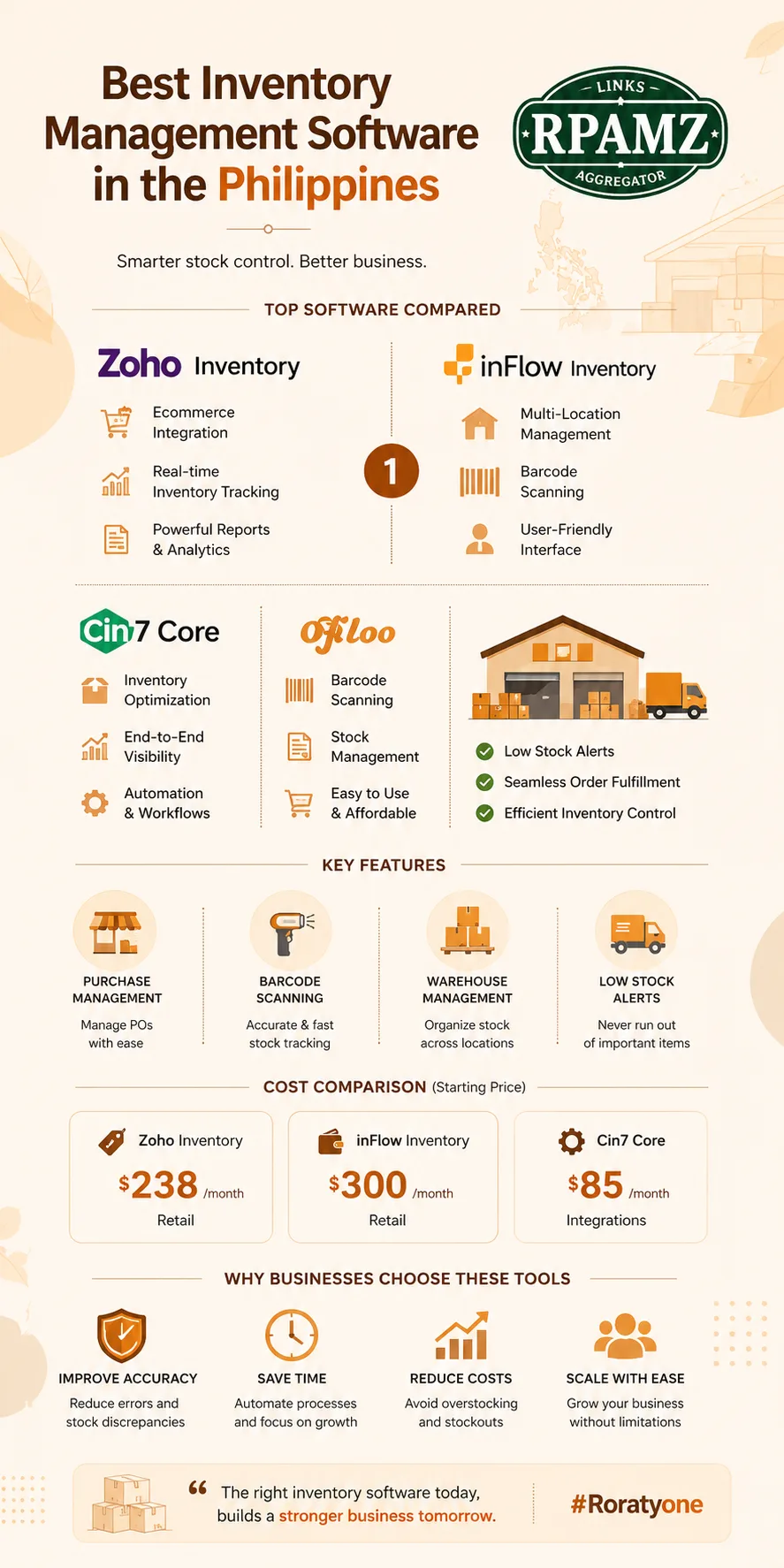
Best inventory management software in the Philippines
1. Zoho Inventory
Zoho Inventory is a strong choice for small and growing businesses that need order management, stock control, and ecommerce integrations without a heavy setup process.
Best for:
- Online sellers
- Small ecommerce brands
- Businesses that need sales and inventory tracking together
Why it stands out:
- Works well with online selling workflows
- Supports stock adjustments, purchase orders, and sales orders
- Integrates with other business tools in the Zoho ecosystem
Pricing: Zoho Inventory offers a free plan and paid tiers. The right plan depends on your order volume and integration needs.
Consider if: You want a practical tool that is easier to adopt than full ERP software.
2. Sortly
Sortly is a user-friendly inventory app with a strong visual approach. It is easy for teams that want simple item tracking without a steep learning curve.
Best for:
- Small shops
- Service businesses with inventory
- Teams that want simple stock visibility
Why it stands out:
- Clean interface
- Easy barcode and photo-based tracking
- Good for organizing items quickly
Pricing: Sortly uses paid plans, with features increasing by tier.
Consider if: You need simplicity more than deep warehouse functionality.
3. inFlow Inventory
inFlow Inventory is a solid option for businesses that need stronger control over stock, purchasing, and sales workflows.
Best for:
- Retailers
- Wholesalers
- Businesses with barcode-heavy operations
Why it stands out:
- SKU and barcode support
- Good purchase order tracking
- Useful reporting for stock movement
Pricing: inFlow uses subscription pricing, with plans based on features and team needs.
Consider if: You want a more serious inventory system without jumping straight into enterprise software.
4. Cin7 Core
Cin7 Core is designed for businesses that sell across multiple channels and need advanced inventory automation.
Best for:
- Multi-channel ecommerce
- Wholesale brands
- Growing businesses with more complex operations
Why it stands out:
- Strong automation
- Channel and order syncing
- Better fit for businesses with larger catalogs and more workflows
Pricing: Cin7 Core is typically more expensive than entry-level tools and is better suited to businesses ready for a larger software investment.
Consider if: You need deeper operational control and can support a more advanced system.
5. Odoo Inventory
Odoo Inventory is part of a modular business suite, which makes it attractive if you want inventory, sales, CRM, and accounting in one ecosystem.
Best for:
- Businesses planning to scale
- Teams wanting an integrated system
- Companies with custom workflow needs
Why it stands out:
- Flexible modules
- Can grow with your business
- Good for businesses that want software consolidation
Pricing: Odoo offers different deployment options, including community and paid plans.
Consider if: You want flexibility and are comfortable with more setup work.
6. Square for Retail
Square for Retail combines POS and inventory features, making it a practical option for storefront businesses.
Best for:
- Retail shops
- Counters and physical stores
- Small teams that need POS plus inventory in one system
Why it stands out:
- Simple retail workflow
- Integrated sales and stock tracking
- Good for small operations
Pricing: Square offers free and paid plans, depending on the features you need.
Consider if: Your business is retail-first and you want a straightforward setup.
Which tool is best for your business type?
For ecommerce sellers
Choose Zoho Inventory or Cin7 Core if you need channel syncing, order management, and scalable inventory control.
For retail stores
Choose Square for Retail or inFlow Inventory if you want easier POS and stock workflows.
For wholesale businesses
Choose inFlow Inventory, Cin7 Core, or Odoo Inventory if your operations involve bulk orders, purchase orders, and customer-specific pricing.
For simple stock tracking
Choose Sortly if you need a clean and easy system without complex setup.
For businesses that want one system for everything
Choose Odoo Inventory if you want inventory as part of a larger business platform.
Pricing considerations for Philippine businesses
When comparing inventory software, look beyond the monthly fee.
You should also check:
- Number of users included
- Limits on products, locations, or orders
- Extra charges for integrations
- Setup or onboarding costs
- Support availability
- Whether the tool scales with your business
For Filipino businesses, the most cost-effective option is not always the cheapest plan. A tool that saves hours of manual work or prevents stock errors can be more valuable than a low monthly subscription.
Integration checklist
A good inventory platform should connect with the tools you already use. Check whether it integrates with:
- Ecommerce platforms
- POS systems
- Accounting software
- Shipping tools
- Marketplaces
- Barcode scanners
- CRM or sales tools
If a tool does not connect well with your stack, you may end up doing manual updates anyway.
How to choose the right software
Ask these questions before you decide:
- How many SKUs do you manage?
- Do you sell online, offline, or both?
- Do you need barcode scanning?
- How many users need access?
- Do you manage one location or multiple branches?
- Do you need purchase orders and supplier tracking?
- What software must it integrate with?
- How much training can your team handle?
If you are unsure, start with a tool that matches your current workflow and can still grow with your business.
Final recommendation
There is no single best option for every business, but there is a best fit for your workflow.
- Zoho Inventory is a strong all-around choice for growing ecommerce brands
- Sortly is best for simple, visual inventory tracking
- inFlow Inventory works well for retail and wholesale operations
- Cin7 Core suits more advanced multi-channel businesses
- Odoo Inventory is ideal for companies wanting a broader business system
- Square for Retail is a good retail-first option
If you want to compare more tools, pricing, and alternatives before deciding, explore RPAMZ for practical software comparisons built for Filipino businesses.
FAQ
What is the best inventory management software in the Philippines?
The best inventory management software depends on your business type. Zoho Inventory is a strong choice for ecommerce, inFlow Inventory works well for retail and wholesale, and Square for Retail is a good option for stores.
Is there free inventory software for small businesses?
Yes. Some tools offer free plans or trials, including Zoho Inventory in certain tiers. However, free plans often have limits on users, orders, or features.
What features should Filipino businesses prioritize?
Focus on stock tracking, purchase orders, barcode support, integrations, and reporting. If you sell across channels, multi-channel syncing is especially important.
Can inventory software help with ecommerce?
Yes. Inventory software can sync stock levels across your store, marketplaces, and sales channels to reduce overselling and manual updates.
Do I need ERP software instead of inventory software?
Not always. If you mainly need stock tracking, ordering, and reporting, inventory software may be enough. ERP makes more sense when you need broader control over finance, operations, and workflows.