
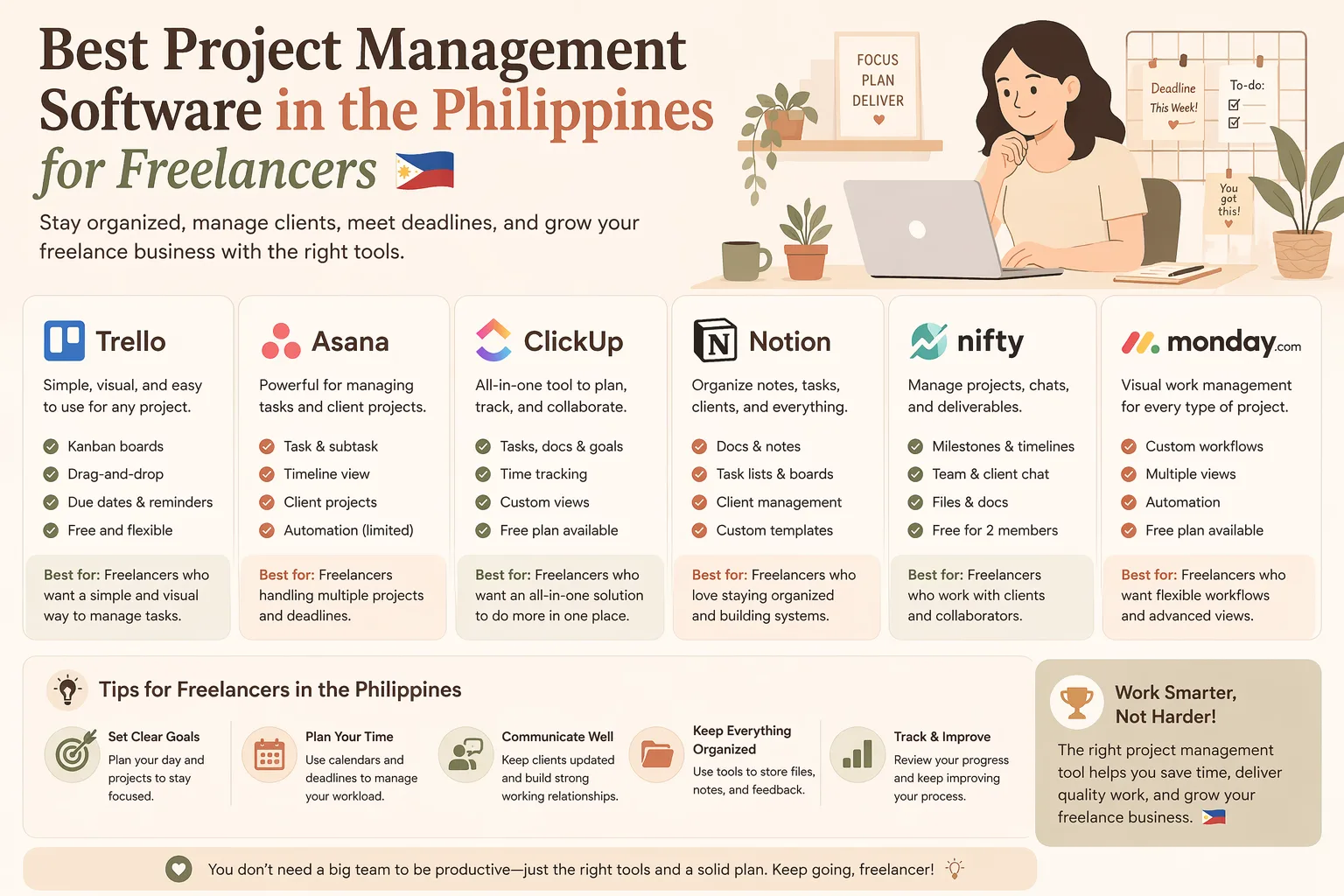
Best Project Management Software in the Philippines for Freelancers
Choosing the right project management software Philippines for freelancers can help you stay on top of client work, deadlines, revisions, and admin tasks without the chaos. The best tool is not always the most advanced or expensive one. For freelancers, the ideal option is usually simple, affordable, and flexible enough to grow with your workload.
Whether you work with local clients, overseas clients, or both, the right tool can keep your tasks, due dates, notes, files, and updates in one place.
What freelancers should look for
When comparing tools, focus on features that actually support solo work:
- Task management for to-do lists and deadlines
- Calendar or timeline views to plan upcoming work
- Client collaboration for sharing updates and files
- Simple interface so you can work faster
- Free plan or low-cost upgrade that fits a freelancer budget
- Mobile access for working on the go
- Integrations with email, Google Drive, or chat apps
If you are running a one-person business, you do not need an enterprise platform. You need a tool that keeps your work organized and reduces busywork.
Best types of project management tools for freelancers
Freelancers have different workflows, so it helps to compare by tool type:
1. Task boards
Best for visual thinkers who like moving tasks from “to do” to “doing” to “done.”
Good for: writers, designers, virtual assistants, social media freelancers
2. Timeline-based tools
Best for managing overlapping deadlines and multiple projects at once.
Good for: web developers, consultants, marketing freelancers
3. All-in-one workspace tools
These combine tasks, notes, documents, and sometimes databases in one app.
Good for: freelancers who want fewer subscriptions
4. Client-facing project tools
These make it easier to share progress, manage approvals, and keep clients updated.
Good for: freelancers with repeat revisions or ongoing client work
Popular options to compare
Below are project management tools that freelancers in the Philippines often compare. Pricing, free tiers, and features can change, so always check the latest plan details before you decide.
Trello
Trello is known for its simple board layout. It is easy to use and a good fit if you want a visual way to manage tasks.
Why freelancers like it:
- Easy to learn
- Good for simple workflows
- Works well for solo projects
Best for: beginners and freelancers who prefer a clean task board
Asana
Asana works well if you manage more complex projects or multiple clients. It gives you more structure than a basic board.
Why freelancers like it:
- Strong task organization
- Helpful for recurring work
- Good for tracking deadlines
Best for: freelancers with several active client projects
ClickUp
ClickUp is popular because it combines many tools in one platform. It can handle tasks, docs, reminders, and more.
Why freelancers like it:
- Flexible features
- Multiple views
- Can grow with your workload
Best for: freelancers who want an all-in-one setup
Notion
Notion is a favorite for custom workspaces. It is not a traditional project manager, but many freelancers use it for planning, notes, and lightweight task tracking.
Why freelancers like it:
- Highly customizable
- Good for content calendars and client dashboards
- Useful for combining notes and projects
Best for: freelancers who want both planning and documentation
Monday.com
Monday.com is a polished platform that works well for teams, but solo freelancers can use it too if they want a more structured interface.
Why freelancers like it:
- Visual dashboards
- Clear workflow tracking
- Good for professional client management
Best for: freelancers who want a premium feel and can justify the cost
Free plans vs paid upgrades
For many freelancers, a free plan is enough at the start. But paid upgrades can become worth it as your workload grows.
A free plan can work if you:
- Handle only a few clients
- Need basic task tracking
- Do not need advanced automation
- Are still testing your workflow
A paid upgrade can help if you:
- Need more projects or storage
- Want better automation
- Collaborate with assistants or subcontractors
- Need advanced reporting or permissions
The goal is not to get the most features. It is to pay for the features you will actually use.
How Filipino freelancers can choose the right tool
Use this simple process to compare project management software:
- List your weekly tasks
- Check how many clients you handle at once
- Decide whether you need boards, timelines, or notes
- Review free plan limits
- Check monthly pricing in PHP or your billing currency
- Test the workflow for a few days before upgrading
If you work with overseas clients, also look at time zone coordination, file sharing, and how easy it is to send updates.
Best project management software for freelancers: quick comparison
| Tool | Best For | Free Plan | Upgrade Level |
|---|---|---|---|
| Trello | Simple task boards | Yes | Affordable |
| Asana | Multi-step project tracking | Yes | Mid-range |
| ClickUp | All-in-one productivity | Yes | Flexible |
| Notion | Custom dashboards and notes | Yes | Affordable to moderate |
| Monday.com | Structured workflows | Limited/varies | Higher-cost |
Final recommendation
If you are looking for project management software Philippines for freelancers, start with the tool that matches your workflow, not the one with the most features. A simple board may be enough if you work alone. If your client load is growing, a tool with timelines, automations, and templates can save time.
Compare free plans first, then upgrade only when the software clearly improves your workflow.
If you want a faster way to compare tools, use RPAMZ as a Philippines-focused comparison and discovery platform for software, affiliate offers, and online business tools. It can help Filipino freelancers shortlist options before committing to a subscription.
FAQ
What is the best project management software for freelancers in the Philippines?
The best tool depends on your workflow. Trello is good for simple boards, Asana for structured tracking, ClickUp for all-in-one needs, and Notion for custom planning.
Is there free project management software for freelancers?
Yes. Many tools offer free plans with basic features, which can be enough for solo freelancers handling a small number of projects.
What features matter most for solo freelancers?
Task lists, deadlines, file sharing, reminders, and an easy-to-use interface are usually the most important.
Should freelancers pay for project management software?
Only if the paid features save time or improve client work. If the free plan already covers your needs, there is no rush to upgrade.
Can small teams use these tools too?
Yes. Many project management tools work well for freelancers and small teams, especially if you later add a virtual assistant or collaborator.