
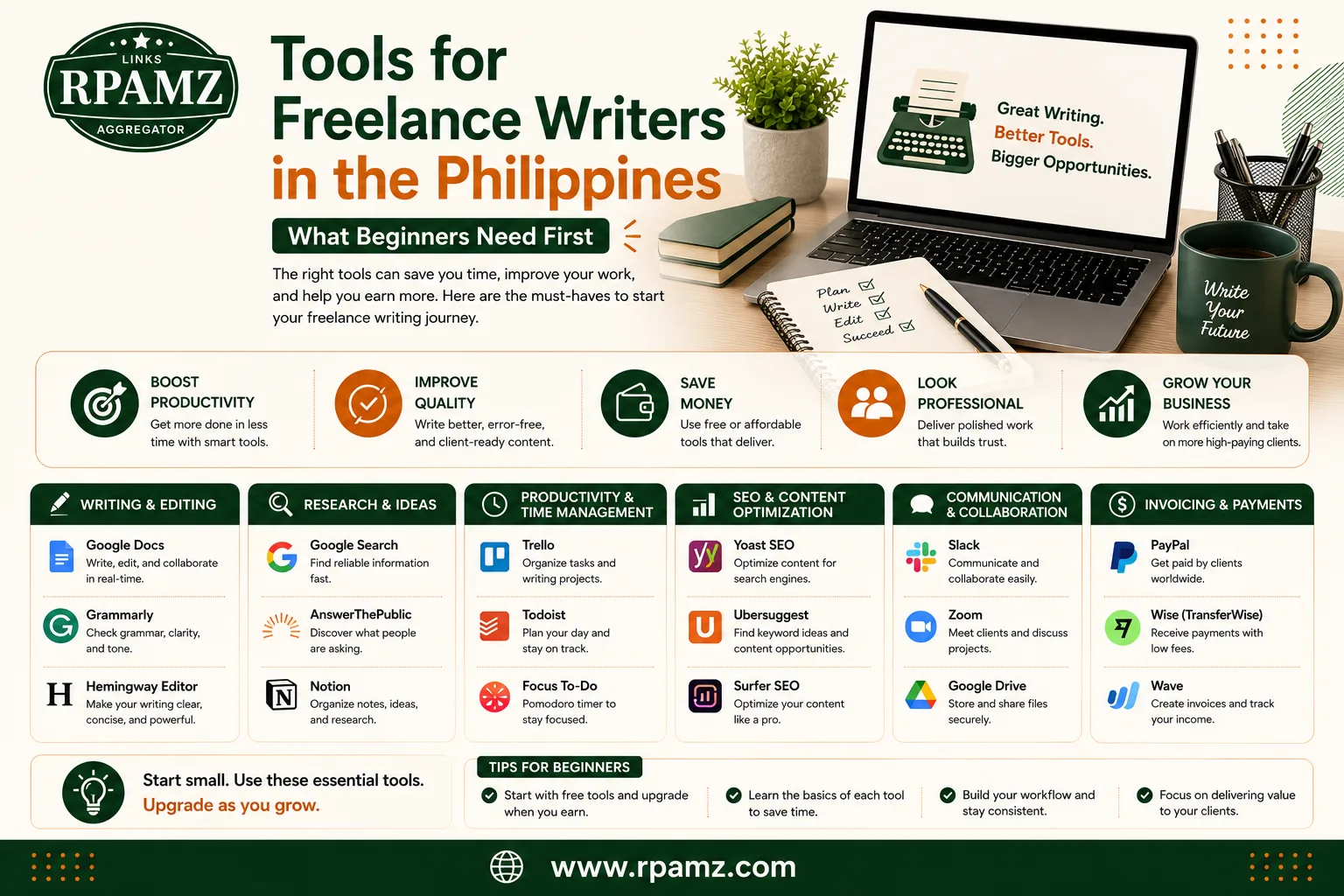
Tools for Freelance Writers in the Philippines What Beginners Need First
Starting a freelance writing career can feel overwhelming, especially when you are deciding which tools are actually worth paying for. The good news is you do not need a huge software stack to begin. Most beginners only need a few reliable tools to write better, stay organized, and deliver work on time.
If you are looking for tools for freelance writers Philippines, this guide breaks down the essentials, compares beginner-friendly options, and explains what to prioritize first. The goal is simple: help you choose tools that support real work, not just add more subscriptions.
What freelance writers in the Philippines actually need
Before buying anything, focus on the core tasks of freelance writing:
- Drafting and editing articles
- Researching topics quickly
- Checking grammar and clarity
- Organizing assignments and deadlines
- Communicating with clients
- Saving files safely and sharing them easily
A beginner does not need a complicated setup. In most cases, the best starting stack is:
- A writing app
- A grammar and proofreading tool
- A research and note-taking tool
- A task tracker or calendar
- Cloud storage for backups
Best tools to start with
Here is a simple comparison of common beginner tools freelance writers can use.
| Need | Beginner-friendly tool options | Best for |
|---|---|---|
| Writing and drafting | Google Docs, Microsoft Word, Notion | Writing drafts and collaborating with clients |
| Grammar checking | Grammarly, LanguageTool | Fixing grammar, spelling, and tone |
| Research and notes | Google Keep, Evernote, Notion | Saving sources and organizing ideas |
| Task management | Trello, Todoist, Notion | Tracking deadlines and article status |
| File storage | Google Drive, Dropbox | Backing up drafts and sharing files |
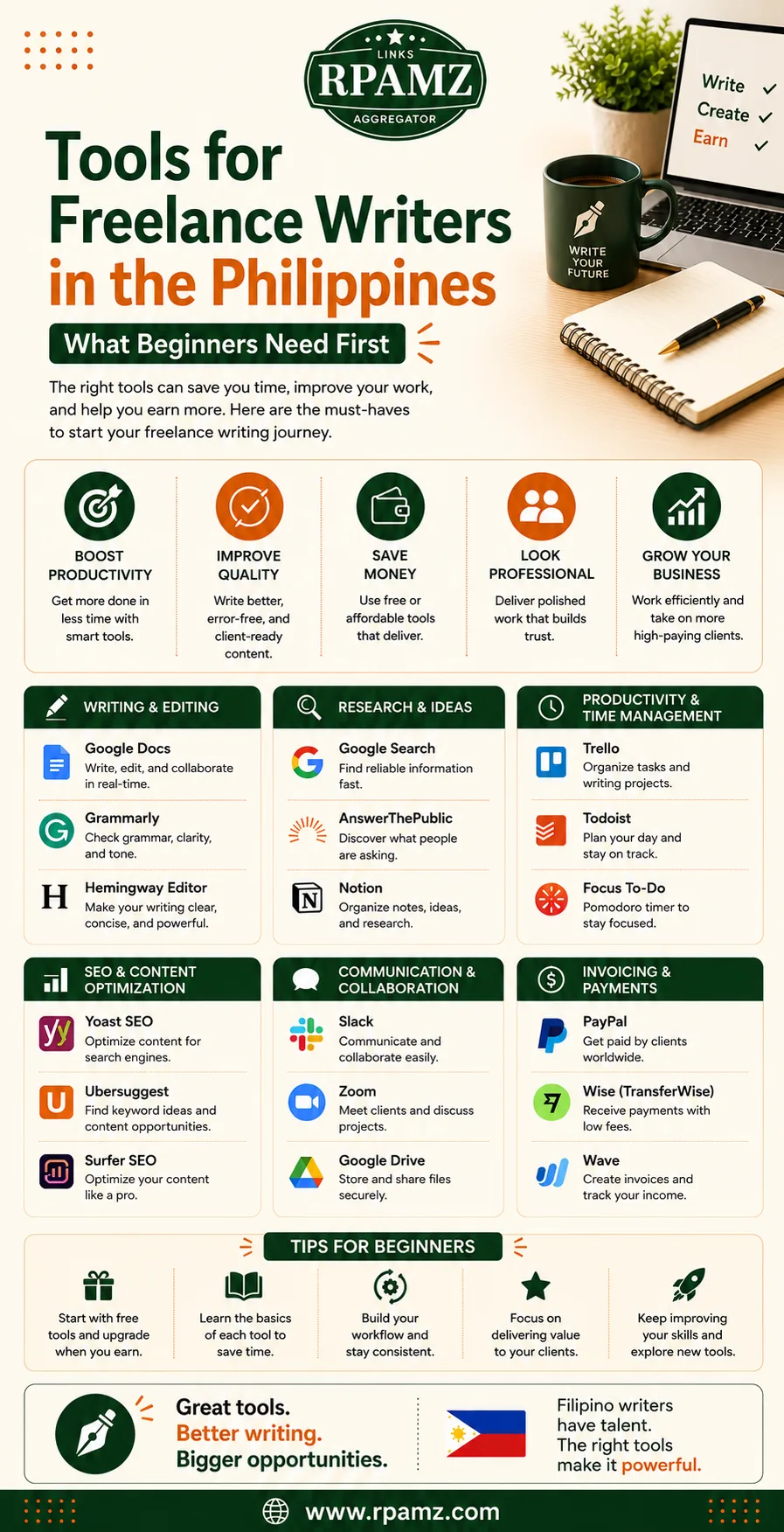
1. Writing tools: keep it simple first
For beginners, the best writing tool is usually the one that is easy to open and hard to overcomplicate.
Google Docs
Google Docs is one of the most practical tools for freelance writers because it is free, cloud-based, and easy to share with clients. It is useful for:
- Drafting articles
- Collaborating with editors
- Leaving comments and revisions
- Accessing files from any device
Microsoft Word
Word is still a strong option if clients prefer DOCX files or if you are already familiar with Microsoft tools. It is especially useful for more formal formatting and offline editing.
Notion
Notion can work well if you like to keep drafts, content calendars, and notes in one place. However, it may feel too flexible for writers who only want a straightforward text editor.
Best beginner choice: Google Docs, because it is free, familiar, and widely accepted.
2. Proofreading and grammar tools: worth using early
Even strong writers make errors when working quickly. A proofreading tool helps catch small mistakes before submission.
Grammarly
Grammarly is popular for checking grammar, punctuation, and clarity. It can help beginners build better habits and spot common mistakes.
LanguageTool
LanguageTool is a good alternative for writers who want a simpler option or want to compare recommendations. It supports grammar and style checks without feeling too heavy.
What to look for
When choosing a grammar tool, check whether it:
- Works in your browser
- Supports Google Docs or your preferred editor
- Gives clear correction suggestions
- Fits your budget
Best beginner choice: Use a free version first, then upgrade only if the paid features solve a real problem.
3. Research tools: avoid messy browsing
Freelance writers spend a lot of time gathering sources, examples, and article ideas. Research tools help keep that process organized.
Google Search and browser bookmarks
For many beginners, the simplest system is enough:
- Search carefully
- Bookmark useful pages
- Save notes in one place
Notion or Evernote
These tools are helpful if you want to organize research by client, topic, or content type.
Google Keep
Google Keep works well for quick notes, content ideas, and short reminders. It is especially useful if you want a light tool without extra complexity.
Best beginner choice: Google Keep or Notion, depending on how organized you want your notes to be.
4. Task management tools: protect your deadlines
A freelance writer can lose money by missing deadlines, so a basic task system matters.
Trello
Trello is easy to understand and good for visual workflows. You can create lists such as:
- Ideas
- In progress
- For review
- Submitted
Todoist
Todoist is better if you like a clean to-do list with due dates and reminders.
Calendar apps
Google Calendar is useful for tracking deadlines, client calls, and content schedules.
Best beginner choice: Trello for workflow, or Google Calendar if you want a simpler setup.
5. File storage and backup tools
Do not rely on a single device for all your work. A cloud backup protects you from losing drafts, revisions, and client files.
Google Drive
Google Drive is one of the easiest options for storing writing files, sharing folders, and keeping drafts synced.
Dropbox
Dropbox is also useful for file sharing and organization, especially if clients already use it.
Best beginner choice: Google Drive, because it is widely used and easy to integrate with other Google tools.
A simple starter stack for freelance writers
If you are just beginning, you do not need to buy five paid subscriptions. A practical starter stack could look like this:
- Writing: Google Docs
- Grammar check: Grammarly free or LanguageTool free
- Research notes: Google Keep
- Task tracking: Trello or Google Calendar
- Backup: Google Drive
This setup is enough for many beginner freelance writers in the Philippines to start taking clients confidently.
Free vs paid tools: what beginners should know
Free tools are often enough at the start, especially if you are still building your workflow. Paid tools may become worthwhile when:
- You write more often
- You handle multiple clients
- You need stronger grammar suggestions
- You want faster organization or automation
Do not upgrade just because a tool is popular. Upgrade when it saves time, reduces mistakes, or helps you work with clients more smoothly.
How to choose tools based on your writing style
Different writers need different setups.
If you write blog posts
Prioritize:
- Google Docs
- Grammar checker
- Research notes
- Calendar
If you write SEO content
Prioritize:
- Google Docs
- Grammar checker
- Keyword and outline notes
- Task tracker
If you handle many clients
Prioritize:
- Task management tool
- Cloud storage
- Clear file naming system
- A reliable communication workflow
Common mistakes beginners make
Avoid these early on:
- Buying too many tools too fast
- Using separate apps for every small task
- Skipping backups
- Ignoring deadlines because the system is not clear
- Paying for premium features before mastering the free version
A lean, simple setup is usually better than an expensive one.
Final thoughts
The best tools for freelance writers Philippines are the ones that help you write consistently, stay organized, and deliver work without stress. Start with simple, affordable tools first. Then add paid options only when your workload and client needs justify the upgrade.
If you want to compare more tools and discover practical alternatives for beginners, check out RPAMZ for tool comparisons, pricing insights, and software suggestions designed for Filipino users.
FAQ
What are the best free tools for freelance writers in the Philippines?
Google Docs, Google Drive, Google Keep, Trello, and free grammar checkers like Grammarly or LanguageTool are good starting points.
Do freelance writers need paid tools right away?
No. Most beginners can start with free tools and upgrade only when they need more advanced features.
What is the most important tool for a beginner freelance writer?
A reliable writing app like Google Docs is usually the first essential tool because it is easy to use and easy to share with clients.
Is Notion good for freelance writers?
Yes, especially if you want to manage drafts, notes, and task tracking in one place. It may be more than some beginners need, though.
How do I choose the right tools for freelance writing?
Focus on writing, proofreading, research, task tracking, and backup. Choose tools that are simple, affordable, and easy to keep using every day.