
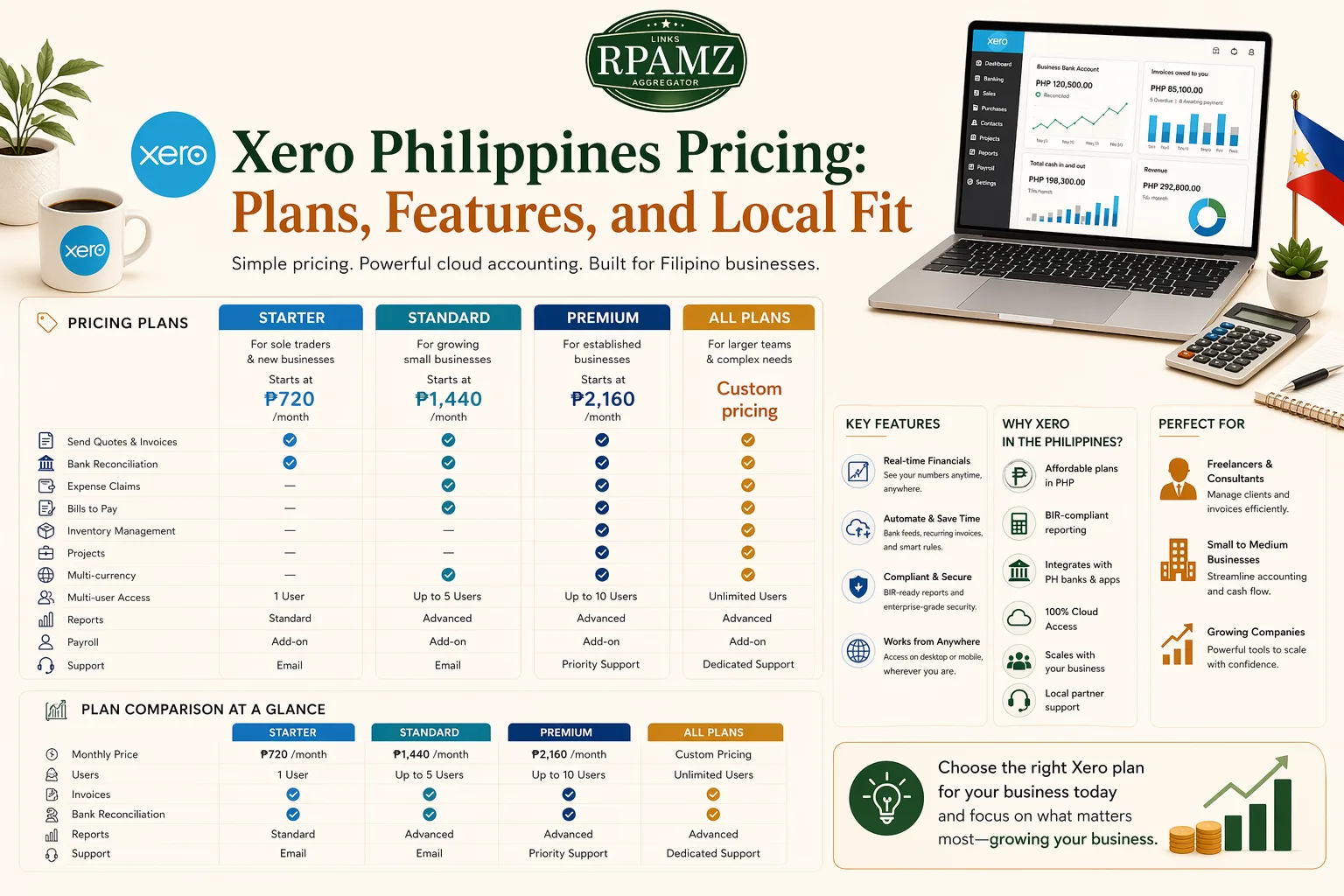
Xero Philippines Pricing: Plans, Features, and Local Fit
If you are comparing accounting tools in the Philippines, Xero Philippines pricing is one of the first things to check. Xero is a popular cloud accounting platform for freelancers, agencies, and SMEs that want cleaner bookkeeping, invoicing, bank reconciliation, and collaboration with accountants.
This guide breaks down how Xero pricing usually works, what to look for in each plan, and whether it is a good fit for Filipino businesses.
What Xero is used for
Xero is cloud accounting software built for small businesses. Common use cases include:
- Sending invoices
- Tracking expenses
- Reconciling bank transactions
- Managing bills and cash flow
- Sharing access with bookkeepers or accountants
- Producing basic financial reports
For many Filipino users, the appeal is simple: fewer manual spreadsheets and better visibility over business money.
Xero Philippines pricing overview
Xero pricing is typically subscription-based and billed monthly. The exact amount can change over time, so it is best to confirm current pricing on the official Xero website before purchasing.
Below is a practical comparison of the common plan structure.
| Plan | Best for | Typical fit | Key things to check |
|---|---|---|---|
| Early | Very small businesses or solo users | Basic invoicing and simple bookkeeping | Limits on bills, invoices, and transactions |
| Growing | Freelancers and small teams | More frequent invoicing and expense tracking | Whether the limits match your monthly volume |
| Established | Businesses with more complexity | Larger transaction volume and advanced reporting | Payroll, multi-currency, and higher limits |
Important note on pricing
Note: Xero pricing may vary by region, promotions, and billing period. If you are in the Philippines, confirm:
- Monthly versus annual billing
- Tax treatment or VAT considerations
- Whether local bank feeds or integrations are available
- If the plan limits are enough for your workflow
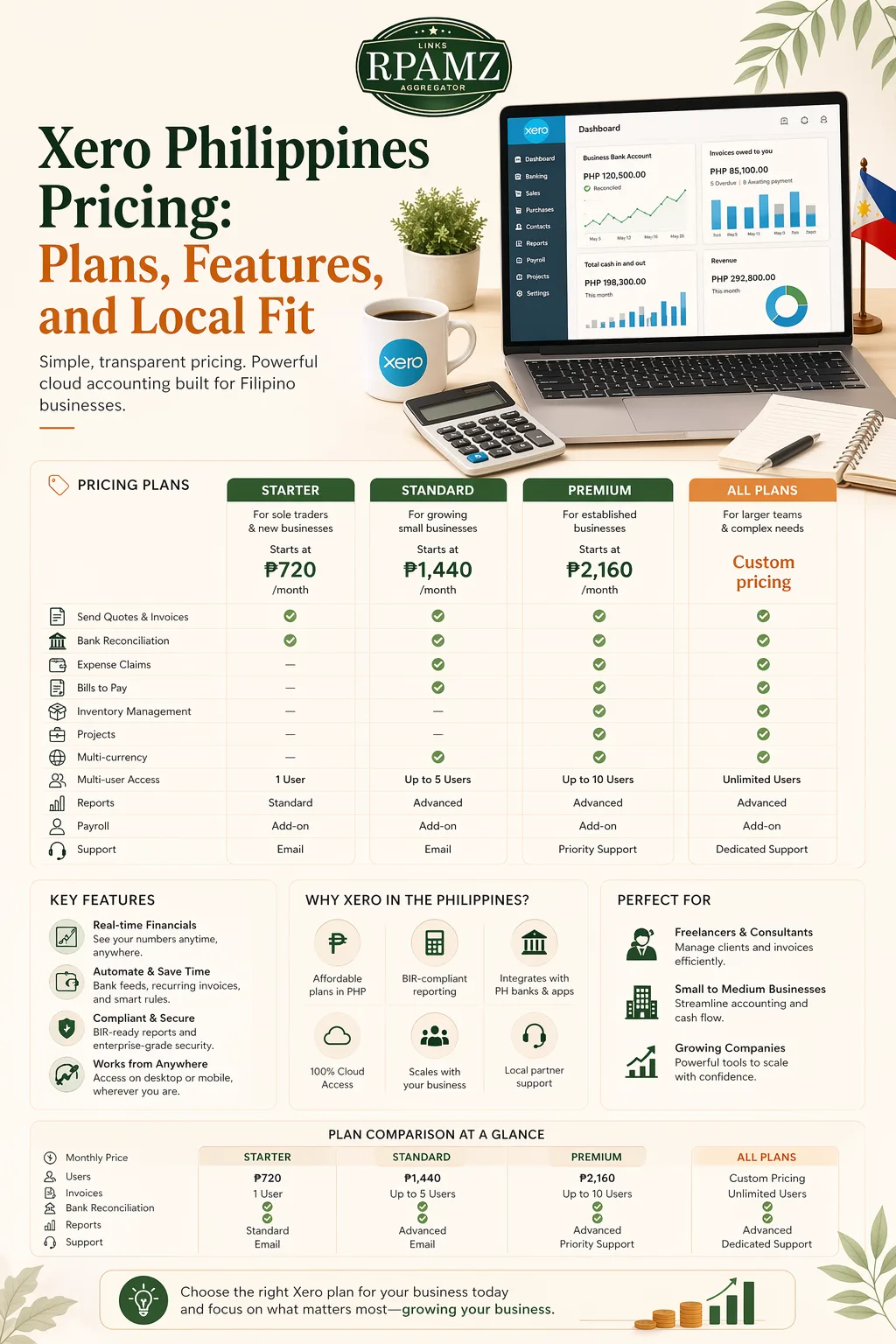
Plan breakdown: what to expect
Early plan
The Early plan is usually designed for very small operations. It can work for:
- New freelancers
- Side hustles
- Very small service businesses
What to watch:
- Low limits on invoices and bills
- May be too restrictive if you bill often
- Good for testing Xero, but not always a long-term fit
Growing plan
This is often the most practical choice for many Filipino freelancers and small agencies.
It is usually a better fit if you:
- Send invoices regularly
- Track recurring expenses
- Need more room for transactions
- Want to work with an accountant in the cloud
Established plan
This plan is for businesses that need more advanced accounting capacity.
It may suit you if you:
- Handle a larger volume of transactions
- Need stronger reporting features
- Manage more than one team member in finance
- Need advanced business controls
Features that matter most to Filipino users
When evaluating Xero Philippines pricing, do not look at price alone. Check whether the features match your actual workflow.
1. Invoicing
Xero makes it easy to create professional invoices, track due dates, and send reminders. This is useful for agencies and freelancers that work on retainers or project-based billing.
2. Bank reconciliation
One of Xero’s biggest strengths is reconciliation. If you connect your bank account, you can match transactions faster and reduce manual entry.
3. Expense tracking
For SMEs with recurring costs like internet, software subscriptions, contractor payments, and office expenses, tracking expenses in one place can save time.
4. Reporting
Xero includes common accounting reports that help you monitor cash flow, profit, and business performance.
5. Collaboration with accountants
If you work with an external bookkeeper or accountant in the Philippines, shared access can improve workflow and reduce back-and-forth.
Simple comparison: who should choose which plan?
| Business type | Likely fit | Why |
|---|---|---|
| Solo freelancer | Early or Growing | Lower complexity and fewer transactions |
| Small creative agency | Growing | Better balance of price and usable limits |
| Growing SME | Established | More room for volume and reporting needs |
| Seasonal business | Depends | Compare invoice limits and monthly usage carefully |
Is Xero worth it in the Philippines?
Xero can be worth it if you value convenience, cloud access, and smoother accounting collaboration.
It may be a strong choice if you:
- Want to move away from spreadsheets
- Need clean invoicing and expense tracking
- Work with an accountant remotely
- Run a service business with regular billing
It may be less attractive if you:
- Only need very basic bookkeeping
- Have a tight budget
- Do not need cloud collaboration
- Rarely issue invoices or track many expenses
Things to check before subscribing
Before you pay for Xero, make sure you verify:
- Current monthly price
- Plan limits
- Supported integrations
- Bank connectivity options
- Tax and compliance fit for your business
- Whether you need add-ons for payroll or inventory
This matters because the cheapest plan is not always the most economical if you outgrow the limits quickly.
Xero vs other accounting tools
If you are comparing tools, Xero is often evaluated against other cloud accounting platforms based on:
- Price
- Ease of use
- Feature limits
- Reporting depth
- Local support and integrations
The best option depends on your business size and how you actually work, not just the subscription fee.
If you want to compare accounting software side by side, RPAMZ can help you review alternatives and pricing so you can pick the right stack for your business.
Final thoughts
Xero Philippines pricing is most useful when you compare the plan cost against your real business needs. For freelancers and small agencies, the middle-tier plan is often the most practical starting point. For growing SMEs, the higher plan may make sense if it prevents workflow bottlenecks.
Before subscribing, review the live pricing, plan limits, and available integrations so you can choose the best-fit accounting software for your business.
If you are still deciding, compare Xero with other accounting tools on RPAMZ to find better alternatives for your budget and workflow.
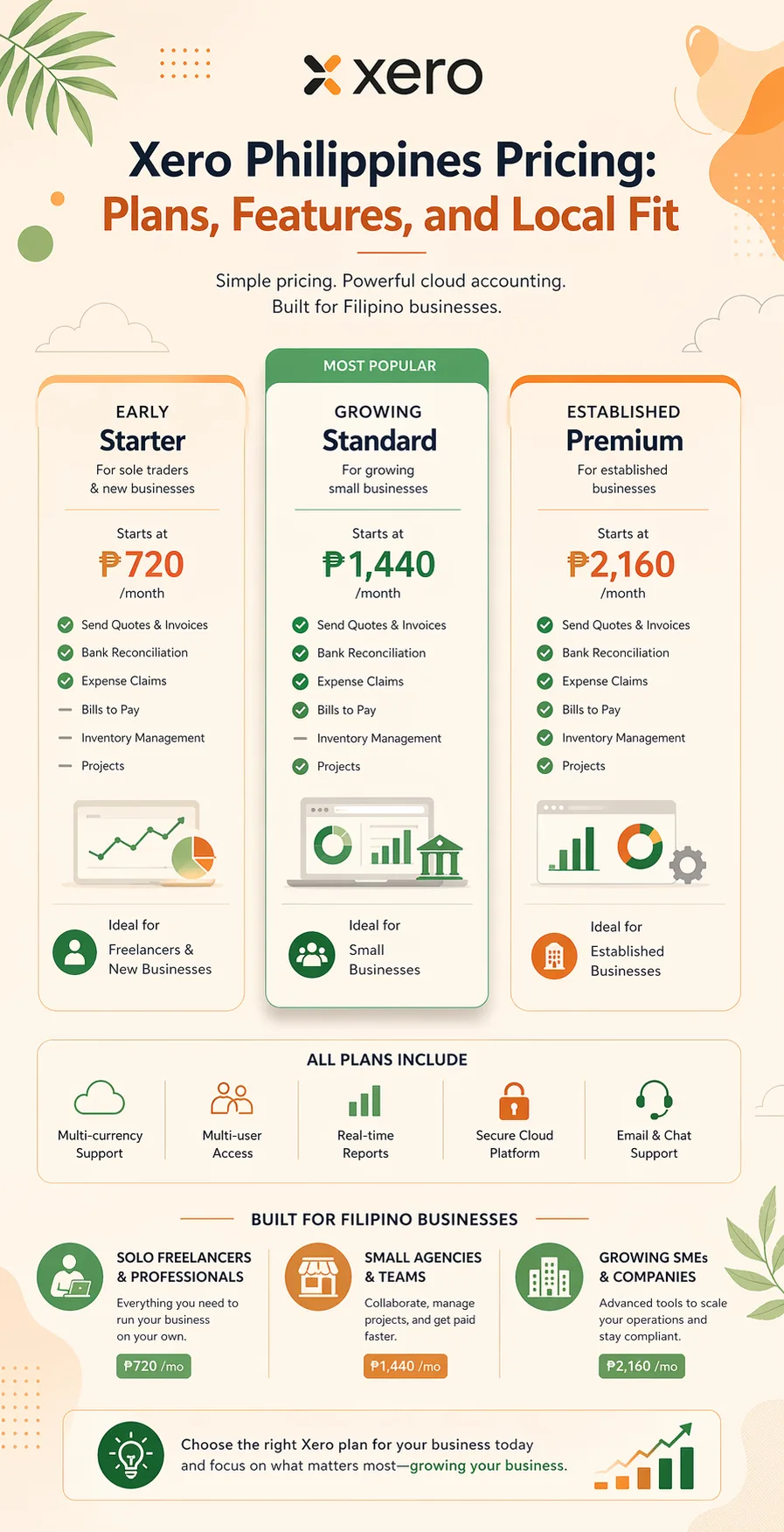
FAQ
How much is Xero in the Philippines?
Xero pricing depends on the current plan and billing setup. Check the official website for the latest subscription rates, because pricing can change over time.
Which Xero plan is best for freelancers?
Many freelancers can start with a lower plan, but the best choice depends on how many invoices and transactions they handle each month.
Is Xero good for small businesses in the Philippines?
Yes, especially for businesses that want cloud invoicing, expense tracking, reconciliation, and collaboration with an accountant.
Does Xero support Philippine businesses?
Xero is used by businesses in many countries, including the Philippines. Before subscribing, confirm local compatibility, tax needs, and integrations.
Is Xero better than spreadsheets?
For businesses with regular invoicing and expenses, Xero is usually more efficient than spreadsheets because it automates more of the bookkeeping workflow.